
Hyperlink
The Hyperlink component is used to create text that acts as a link. It's styled to look like a traditional web hyperlink and can be used to navigate to external URLs or to trigger actions within the application. It inherits from Button and is styled with flat: true and highlighted: true by default.
Basic Hyperlink to URL
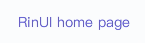
To create a hyperlink that opens an external URL in the default web browser, set the text for display and the openUrl (or its alias url) property.
qml
import QtQuick 2.15
import RinUI

// ...

Hyperlink {
    text: qsTr("Visit RinUI Project")
    openUrl: "https://github.com/RinLit-233-shiroko/Rin-UI"
}
## Hyperlink for In-App Actions

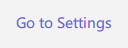
You can also use a `Hyperlink` to trigger internal application actions by handling its `onClicked` signal. If you only want to perform an in-app action and not navigate to a URL, do not set the `openUrl` property.

<div align="center">
  <img src="/assets/images/docs/Hyperlink/url.png" alt="Hyperlink for In-App Actions">
</div>

<div align="center">
  <img src="/assets/images/BasicInput/Hyperlink/hyperlink-action.png" alt="Hyperlink for In-App Actions">
</div>

```qml
Hyperlink {
    text: qsTr("Go to Settings")
    onClicked: {
        // 导航到应用内设置页面的逻辑
        console.log("Settings link clicked");
        // 示例: stackView.push(settingsPageComponent)
    }
}
## Key Properties

*   `text`: `string` - The visible text of the hyperlink.
*   `openUrl`: `url` - The URL to open when the hyperlink is clicked. The default `onClicked` handler will attempt to open this URL externally.
*   `url`: `url` - An alias for `openUrl`.
*   `enabled`: `bool` - Whether the control is interactive. Defaults to `true`.

Being a `Button` derivative, other properties like `icon.name`, `icon.source`, etc., can also be used. The default styling (`flat: true`, `highlighted: true`) gives it a typical link appearance.

## Signals

*   `onClicked()`: Emitted when the hyperlink is clicked. If `openUrl` is also set, the default behavior is to try opening that URL. Custom logic can be added to this handler for in-app navigation or other actions.