
SettingCard
The SettingCard component, inheriting from Frame, is designed to display a single piece of information or a setting in a card-like row. It features a structured layout with an optional icon on the left, a title and description area, and a slot on the right (the content property) for additional controls or information.
Unlike SettingExpander, SettingCard does not have a collapsible content area; it's a single, non-expandable panel, suitable for straightforward settings or information display.
Basic SettingCard
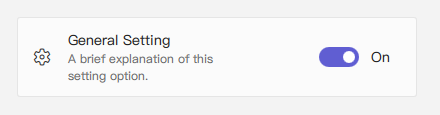
A SettingCard typically includes an icon, a title, and a description. The content property (which is the default property) can be used to place controls or other items on the right side of the card.
qml
import QtQuick 2.15
import RinUI

// ...

SettingCard {
    width: 400 // Or Layout.fillWidth: true if in a Layout like ColumnLayout
    icon: "ic_fluent_settings_20_regular" // Fluent icon name for the left area
    title: qsTr("General Setting")
    description: qsTr("A brief explanation of this setting option.")

    // Control placed on the right side via the 'content' default property
    Switch { // This Switch is assigned to the 'content' property
        checked: true
    }
}
## SettingCard for Information Display

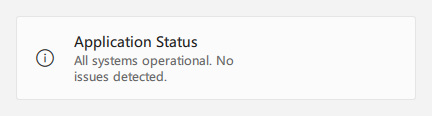
If no control is needed on the right (i.e., the `content` property is not populated with any items), the card can be used to display information with consistent styling.

<div align="center">
  <img src="/assets/images/docs/SettingCard/example-3.png" alt="SettingCard for Information Display">
</div>

<div align="center">
  <img src="/assets/images/ListAndCollections/SettingCard/settingcard-info.png" alt="SettingCard for Information Display">
</div>

```qml
import RinUI // Consistent import

SettingCard {
    width: 400
    icon: "ic_fluent_info_20_regular"
    title: qsTr("Application Status")
    description: qsTr("All systems operational. No issues detected.")
    // No child items provided for the 'content' slot on the right
}
## Key Properties

*   `title`: `string` - The main text label for the setting card, displayed prominently.
*   `description`: `string` - Optional descriptive text displayed below the `title`, typically in a smaller font or secondary color.
*   `icon`: `string` (alias for internal `IconWidget`'s `icon` property) - The Fluent icon name for the icon displayed on the left side of the card.
*   `source`: `url` (alias for internal `IconWidget`'s `source` property) - URL for a custom image to be used as the icon.
*   `iconSize`: `real` (alias for internal `IconWidget`'s `size` property) - Size of the icon. Defaults to `20`.
*   `content`: `Item` (default property alias for `rightContent.data`) - Allows adding a QML Item (typically a single control like `Switch`, `ComboBox`, or text label) to the right side of the card.

**Inherited from `Frame`:**
*   `color`: `color` - The background color of the card.
*   `radius`: `real` - The corner radius of the card.
*   `borderColor`: `color` - The border color of the card.
*   `borderWidth`: `int` - The border width of the card.
*   `frameless`: `bool` - If `true`, the card's background and border are not visible.
*   `hoverable`: `bool` - Enables hover effects on the card.
*   Padding properties (`leftPadding`, `rightPadding`, `topPadding`, `bottomPadding`): `SettingCard` sets specific default values (e.g., `leftPadding: 15`, `rightPadding: 15`, `topPadding: 13`, `bottomPadding: 13`).

## Example Usage in a List

`SettingCard` is suitable for lists of settings or options where each item is distinct and does not require an expandable section.

<div align="center">
  <img src="/assets/images/docs/SettingCard/example.png" alt="Example Usage in a List">
</div>

```qml
import QtQuick.Layouts 1.15 // For ColumnLayout
import RinUI // Consistent import

// ...

ColumnLayout { // Using ColumnLayout for automatic sizing and spacing
    width: 350
    spacing: 2 // Small spacing between cards

    SettingCard {
        Layout.fillWidth: true // Makes the card take the width of the ColumnLayout
        title: qsTr("Profile Visibility")
        icon: "ic_fluent_person_20_regular"
        content: ComboBox { model: ["Public", "Friends Only", "Private"] }
    }
    SettingCard {
        Layout.fillWidth: true
        title: qsTr("Desktop Notifications")
        icon: "ic_fluent_alert_20_regular"
        description: qsTr("Enable or disable desktop notifications.")
        content: Switch { checked: false }
    }
    SettingCard {
        Layout.fillWidth: true
        title: qsTr("Data Sync")
        icon: "ic_fluent_cloud_sync_20_regular"
        description: qsTr("Last synced: 2 hours ago")
        // No control in 'content', just info
    }
}
## Related Components

*   `Frame`: The base component from which `SettingCard` inherits its framed appearance.
*   `SettingExpander`: For settings that require an additional collapsible content area for more details or sub-settings.
*   `SettingItem`: Another component for displaying rows of settings, typically simpler and often used within a `SettingExpander`. `SettingCard` provides a more visually distinct "card" structure with dedicated icon and content areas.