
NavigationBar(导航栏)
NavigationBar 是一个提供垂直导航区域的控件。它可以折叠或展开,包含可点击的导航项,用于在不同页面之间导航。
基本导航栏
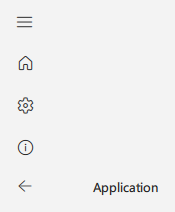
qml
NavigationBar {
    id: navigationBar
    windowTitle: qsTr("应用程序")
    windowIcon: "qrc:/images/icon.png"
    windowWidth: 1200

    navigationItems: [
        {title: qsTr("首页"), page: "HomePage.qml", icon: "ic_fluent_home_20_regular"},
        {title: qsTr("设置"), page: "SettingsPage.qml", icon: "ic_fluent_settings_20_regular"},
        {title: qsTr("关于"), page: "AboutPage.qml", icon: "ic_fluent_info_20_regular"}
    ]
}
折叠的导航栏
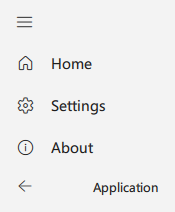
qml
NavigationBar {
    id: navigationBar
    windowTitle: qsTr("应用程序")
    windowIcon: "qrc:/images/icon.png"
    windowWidth: 800
    collapsed: true

    navigationItems: [
        {title: qsTr("首页"), page: "HomePage.qml", icon: "ic_fluent_home_20_regular"},
        {title: qsTr("设置"), page: "SettingsPage.qml", icon: "ic_fluent_settings_20_regular"},
        {title: qsTr("关于"), page: "AboutPage.qml", icon: "ic_fluent_info_20_regular"}
    ]
}
重要属性
collapsed: 导航栏是否折叠navigationItems: 包含标题、页面和图标的导航项数组titleBarEnabled: 是否在导航栏顶部显示标题栏expandWidth: 展开的导航栏宽度minimumExpandWidth: 展开导航栏的最小宽度windowTitle: 在标题栏中显示的标题windowIcon: 在标题栏中显示的图标windowWidth: 窗口的宽度stackView: 用于页面导航的 StackViewcurrentPage: 当前页面的 URL
重要方法
isNotOverMinimumWidth(): 如果窗口小于最小宽度则返回 true