
NavigationBar
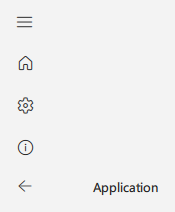
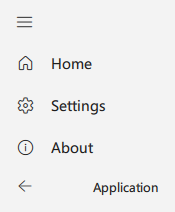
NavigationBar is a control that provides a vertical navigation area. It can be collapsed or expanded and contains navigation items that can be clicked to navigate between different pages.
Basic NavigationBar
qml
NavigationBar {
    id: navigationBar
    windowTitle: qsTr("Application")
    windowIcon: "qrc:/images/icon.png"
    windowWidth: 1200

    navigationItems: [
        {title: qsTr("Home"), page: "HomePage.qml", icon: "ic_fluent_home_20_regular"},
        {title: qsTr("Settings"), page: "SettingsPage.qml", icon: "ic_fluent_settings_20_regular"},
        {title: qsTr("About"), page: "AboutPage.qml", icon: "ic_fluent_info_20_regular"}
    ]
}
Collapsed NavigationBar
qml
NavigationBar {
    id: navigationBar
    windowTitle: qsTr("Application")
    windowIcon: "qrc:/images/icon.png"
    windowWidth: 800
    collapsed: true

    navigationItems: [
        {title: qsTr("Home"), page: "HomePage.qml", icon: "ic_fluent_home_20_regular"},
        {title: qsTr("Settings"), page: "SettingsPage.qml", icon: "ic_fluent_settings_20_regular"},
        {title: qsTr("About"), page: "AboutPage.qml", icon: "ic_fluent_info_20_regular"}
    ]
}
Important Properties
collapsed: Whether the navigation bar is collapsednavigationItems: Array of navigation items with title, page, and icontitleBarEnabled: Whether to show the title bar at the top of the navigation barexpandWidth: The width of the expanded navigation barminimumExpandWidth: The minimum width to expand the navigation barwindowTitle: The title to show in the title barwindowIcon: The icon to show in the title barwindowWidth: The width of the windowstackView: The StackView to use for page navigationcurrentPage: The URL of the current page
Important Methods
isNotOverMinimumWidth(): Returns true if the window is smaller than the minimum width