
InfoBar
InfoBar is a control that displays informational messages to users. It can show different types of messages (Info, Success, Warning, Error) with customizable content and automatic dismissal.
Basic InfoBar

qml
InfoBar {
    title: qsTr("Information")
    text: qsTr("This is an informational message.")
    severity: Severity.Info
}
InfoBar with Custom Content

qml
InfoBar {
    title: qsTr("Action Required")
    text: qsTr("Please review the following options:")

    customContent: [
        Button {
            text: qsTr("Accept")
            onClicked: console.log("Accepted")
        },
        Button {
            text: qsTr("Dismiss")
            onClicked: console.log("Dismissed")
        }
    ]
}
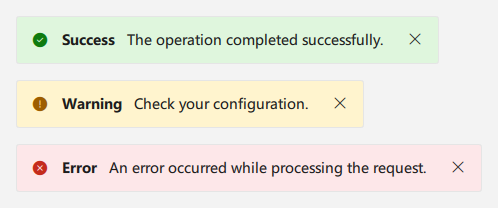
Different Severity Levels

qml
// Success InfoBar
InfoBar {
    title: qsTr("Success")
    text: qsTr("Operation completed successfully!")
    severity: Severity.Success
}

// Warning InfoBar
InfoBar {
    title: qsTr("Warning")
    text: qsTr("Please check your configuration.")
    severity: Severity.Warning
}

// Error InfoBar
InfoBar {
    title: qsTr("Error")
    text: qsTr("An error occurred during operation.")
    severity: Severity.Error
}
Auto-dismiss InfoBar
qml
InfoBar {
    title: qsTr("Auto Dismiss")
    text: qsTr("This message will disappear in 3 seconds.")
    severity: Severity.Info
    timeout: 3000
    closable: true
}
Important Properties
title: The title of the info bartext: The main content textseverity: The severity level (Info, Success, Warning, Error)timeout: Auto-dismiss timeout in milliseconds (-1 for no auto-dismiss)closable: Whether the close button is visibleiconVisible: Whether the severity icon is displayedcustomContent: Custom content items to display
Important Signals
InfoBardoes not provide aclosed()signal. Useclose()to start the closing animation.