
NavigationView
NavigationView combines a vertical navigation bar, page stack, and content card. It handles top-level page navigation in RinUI applications. FluentWindow already contains one, so manual creation is only needed for custom windows or embedded layouts.
Using It in FluentWindow
Declare navigation items directly on FluentWindow:
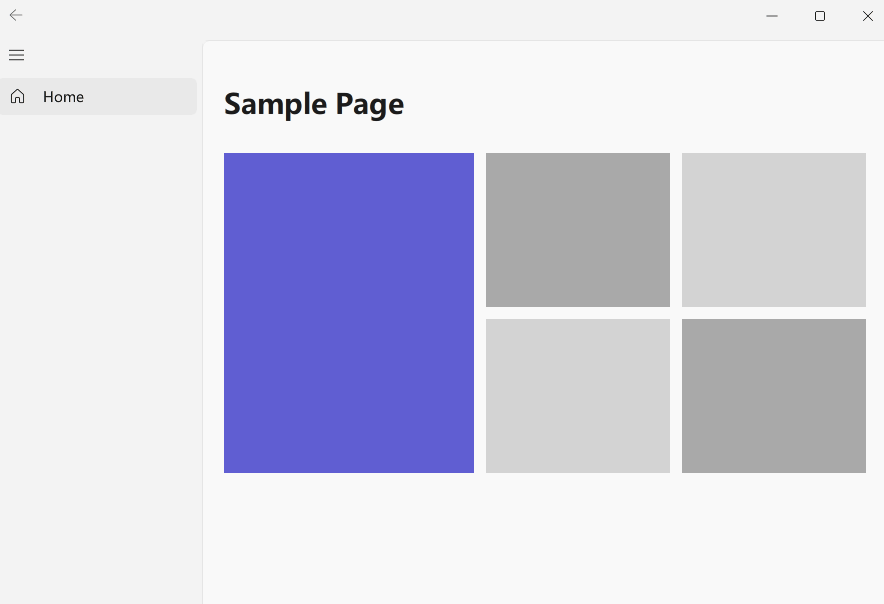
FluentWindow {
    width: 1100
    height: 720

    navigationItems: [
        {
            title: qsTr("Home"),
            page: Qt.resolvedUrl("pages/Home.qml"),
            icon: "ic_fluent_home_20_regular"
        },
        {
            title: qsTr("Documentation"),
            page: Qt.resolvedUrl("pages/Docs.qml"),
            icon: "ic_fluent_document_20_regular",
            subItems: [
                {
                    title: qsTr("Getting started"),
                    page: Qt.resolvedUrl("pages/GettingStarted.qml")
                }
            ]
        },
        {
            title: qsTr("Settings"),
            page: Qt.resolvedUrl("pages/Settings.qml"),
            icon: "ic_fluent_settings_20_regular",
            position: Position.Bottom
        }
    ]
}
page can be a QML file path, a Qt.resolvedUrl() result, or a Component. position accepts Position.Top, Position.Center, Position.None, or Position.Bottom; items without one appear in the middle navigation region.
Standalone Usage
FluentWindow {
    width: 1100
    height: 720
    defaultPage: homePage

    navigationItems: [
        {
            title: qsTr("Home"),
            page: homePage,
            icon: "ic_fluent_home_20_regular"
        }
    ]

    Component {
        id: homePage
        Item {
            Text {
                anchors.centerIn: parent
                text: qsTr("Home page")
                font.pixelSize: 24
            }
        }
    }
}
When used standalone, provide the owning window through `window` so window size, title, and window-control state are available.

## Navigation Behavior

- When `defaultPage` is empty, the first navigation item loads automatically.
- The navigation bar collapses automatically below `minimumExpandWidth` (default `900`).
- `navExpandWidth: 0` uses dynamic width based on titles; values greater than `0` use a fixed width.
- Dynamic width is constrained between `minNavbarWidth` and `maxNavbarWidth`, roughly `200` to `400` by default.
- `appLayerEnabled` controls the content card background; `contentCornerClipEnabled` controls corner clipping.

## Page Navigation Methods

### `push(page, properties)`

Navigate to a page and add the current page to history. `properties` are passed to the target page:

```qml
navigationView.push(Qt.resolvedUrl("pages/Detail.qml"), {
    itemId: 42
})
### `pushStack(page, properties)`

`pushStack()` is a convenience entry point for `safePush(page, false, true, properties)`, marking the navigation as coming from the navigation bar flow. It still goes through `safePush()` and replaces the current page with `stackView.replace(...)`; it does not create an independent StackView history.

Back history is managed by `NavigationView.lastPages`, which retains the two most recent pages. You can use this entry point when application code needs explicit control over the navigation flow, but do not treat it as a direct call to Qt's `StackView.push()`.

### `pop()` / `safePop()`

Return to the previous page. `safePop()` safely does nothing when history is empty; the navigation bar's back button uses it.

### `safePush(page, reload, fromNavigation, properties)`

Low-level navigation with full control. Prefer `push()` in normal application code, and use `safePush()` when reloading or triggering navigation from the navigation bar.

## Signals

`pageChanged()` is emitted after `currentPage` is updated but before the `stackView.replace(...)` transition finishes. It is useful for synchronizing navigation state, titles, or selection indicators, but the target page may not have completed its entrance animation yet:

```qml
NavigationView {
    onPageChanged: {
        console.log("Current page:", currentPage)
    }
}
If logic requires the target page to have completed layout or animation, observe the page's own Component.completed, StackView.statusChanged, or the relevant animation-finished event instead of assuming pageChanged() means the transition is complete.
Key Properties
| Property | Default | Description |
|---|---|---|
navigationItems | [] | Navigation item array. |
currentPage | "" | Current page key or URL. |
defaultPage | "" | Startup page. |
lastPages | [] | Back history, keeping up to two pages. |
navExpandWidth | 0 | Expanded width; 0 means dynamic width. |
navMinimumExpandWidth | 900 | Window width threshold for automatic collapse. |
appLayerEnabled | true | App-layer background for the content area. |
contentCornerClipEnabled | true | Whether content card corners are clipped. |
pushEnterFromY | height / 2 | Starting vertical offset for page entry animation. |
Related Components
- NavigationBar: the underlying vertical navigation bar.
- FluentWindow: window with a built-in
NavigationView. - FluentPage: standard content container for navigation pages.
- Segmented and SelectorBar: other navigation controls.