
ColorPicker
ColorPicker provides an HSV color field, a color preview, and optional channel inputs for selecting and fine-tuning colors. Read or set the selected color with color; enable alphaEnabled to edit transparency.
Basic Usage
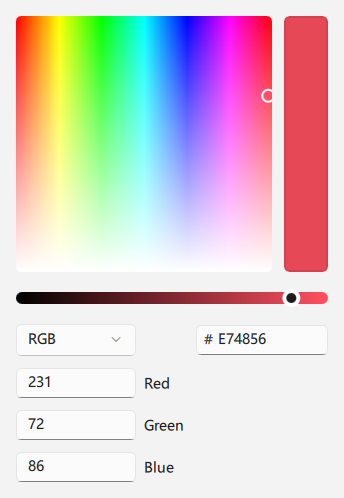
qml
ColorPicker {
    color: "#E74856"
}
## Enable Alpha

`alphaEnabled` shows the alpha controls. A color can include an alpha channel, for example `#80E74856`.

<div align="center">
  <img src="/assets/images/docs/ColorPicker/example-3.png" alt="Enable Alpha">
</div>

```qml
ColorPicker {
    color: "#80E74856"
    alphaEnabled: true
}
## Ring Mode

The default picker uses a square HSV field. Set `ringMode` to display a hue ring instead.

<div align="center">
  <img src="/assets/images/docs/ColorPicker/example-4.png" alt="Ring Mode">
</div>

```qml
ColorPicker {
    color: "#3A86FF"
    ringMode: true
}
## Auxiliary Inputs

Hide channel, hexadecimal, or alpha inputs when space is limited.

<div align="center">
  <img src="/assets/images/docs/ColorPicker/example.png" alt="Auxiliary Inputs">
</div>

```qml
ColorPicker {
    color: "#107C10"
    colorChannelInputVisible: false
    hexInputVisible: true
    alphaSliderVisible: false
    alphaInputVisible: false
}
## Properties

- `color`: Selected color; updates the internal HSV and alpha values.
- `hue`, `saturation`, `value`: HSV components.
- `alpha`: Opacity from `0` to `1`.
- `alphaEnabled`: Whether alpha editing controls are enabled.
- `ringMode`: Whether to use a hue ring; defaults to `false`.
- `collapsed`: Whether advanced color inputs are collapsed.
- `moreVisible`: Whether additional color options are shown.
- `colorSliderVisible`: Whether the color slider is shown.
- `colorChannelInputVisible`: Whether channel inputs are shown.
- `hexInputVisible`: Whether the hexadecimal input is shown.
- `alphaSliderVisible`, `alphaInputVisible`: Whether the alpha slider and input are shown.
- `channelFieldWidth`: Width of the color-channel input fields.