
Iconography
Iconography is a visual design language that can be used to communicate information quickly and effectively. RinUI provides a comprehensive set of icons that follow consistent design principles and can be easily integrated into your applications.
Fluent System Icons5,656 / 5,656 icons
Basic Icon Usage

qml
import RinUI

Icon {
    name: "ic_fluent_apps_16_regular"
    size: 24
}
Icon with Different Sizes

qml
Column {
    spacing: 8

    Icon {
        name: "ic_fluent_mail_16_regular"
        size: 16
    }

    Icon {
        name: "ic_fluent_mail_20_regular"
        size: 20
    }

    Icon {
        name: "ic_fluent_mail_24_regular"
        size: 24
    }

    Icon {
        name: "ic_fluent_mail_32_regular"
        size: 32
    }
}
Icon with Colors
qml
Row {
    spacing: 12

    Icon {
        name: "ic_fluent_checkmark_circle_24_regular"
        color: "#0078D4"
    }

    Icon {
        name: "ic_fluent_error_circle_24_regular"
        color: "#D83B01"
    }

    Icon {
        name: "ic_fluent_warning_24_regular"
        color: "#FF8C00"
    }

    Icon {
        name: "ic_fluent_info_circle_24_regular"
        color: "#0078D4"
    }
}
Icon in Buttons

qml
Row {
    spacing: 12

    Button {
        icon.name: "ic_fluent_save_20_regular"
        text: qsTr("Save")
    }

    Button {
        icon.name: "ic_fluent_delete_20_regular"
        text: qsTr("Delete")
    }

    ToolButton {
        icon.name: "ic_fluent_settings_20_regular"
    }
}
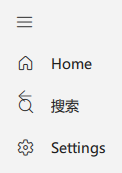
Icon in Navigation

qml
NavigationBar {
    items: [
        {
            title: qsTr("Home"),
            icon: "ic_fluent_home_24_regular"
        },
        {
            title: qsTr("Search"),
            icon: "ic_fluent_search_24_regular"
        },
        {
            title: qsTr("Settings"),
            icon: "ic_fluent_settings_24_regular"
        }
    ]
}
Important Properties
name: The icon name (e.g., "ic_fluent_apps_16_regular")size: The icon size in pixelscolor: The icon colorvisible: Whether the icon is visibleenabled: Whether the icon is enabled
Common Icon Categories
System Icons
ic_fluent_apps_*: Application iconsic_fluent_settings_*: Settings iconsic_fluent_home_*: Home icons
Action Icons
ic_fluent_save_*: Save actionsic_fluent_delete_*: Delete actionsic_fluent_edit_*: Edit actions
Status Icons
ic_fluent_checkmark_*: Success indicatorsic_fluent_error_*: Error indicatorsic_fluent_warning_*: Warning indicators
Navigation Icons
ic_fluent_home_*: Home navigationic_fluent_arrow_*: Directional navigationic_fluent_chevron_*: Expand/collapse indicators