
TableView
TableView is a control for displaying data in rows and columns. It extends the standard QML TableView with custom styling and functionality.
Basic TableView
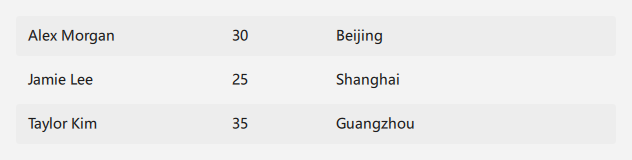
qml
import Qt.labs.qmlmodels
TableView {
    id: tableView
    width: 600
    height: 180

    columnWidthProvider: function(column) { return [200, 100, 200][column] }
    rowHeightProvider: function(row) { return 40 }
    model: TableModel {
        TableModelColumn { display: "name" }
        TableModelColumn { display: "age" }
        TableModelColumn { display: "city" }
        rows: [
            { name: "Alex Morgan", age: 30, city: "Beijing" },
            { name: "Jamie Lee", age: 25, city: "Shanghai" },
            { name: "Taylor Kim", age: 35, city: "Guangzhou" }
        ]
    }
}
## Custom Column Widths

<div align="center">
  <img src="/assets/images/docs/TableView/example-3.png" alt="Custom Column Widths">
</div>

```qml
import Qt.labs.qmlmodels
TableView {
    id: tableView
    width: 600
    height: 180

    columnWidthProvider: function(column) {
        return [150, 100, 350][column]
    }
    rowHeightProvider: function(row) { return 40 }
    model: TableModel {
        TableModelColumn { display: "name" }
        TableModelColumn { display: "age" }
        TableModelColumn { display: "city" }
        rows: [
            { name: "Alex Morgan", age: 30, city: "Beijing" },
            { name: "Jamie Lee", age: 25, city: "Shanghai" },
            { name: "Taylor Kim", age: 35, city: "Guangzhou" }
        ]
    }
}
## Sorting by Column

<div align="center">
  <img src="/assets/images/docs/TableView/example.png" alt="Sorting by Column">
</div>

```qml
import Qt.labs.qmlmodels
TableView {
    id: tableView
    width: 600
    height: 180

    columnWidthProvider: function(column) { return [200, 100, 300][column] }
    model: TableModel {
        TableModelColumn { display: "name" }
        TableModelColumn { display: "age" }
        TableModelColumn { display: "city" }
        rows: [
            { name: "Alex Morgan", age: 30, city: "Beijing" },
            { name: "Jamie Lee", age: 25, city: "Shanghai" },
            { name: "Taylor Kim", age: 35, city: "Guangzhou" }
        ]
    }
}
## Important Properties

- `model`: The data model for the table
- `clip`: Whether to clip content that extends beyond the view boundaries
- `ScrollBar.vertical` and `ScrollBar.horizontal`: The vertical and horizontal scroll bars

## Important Methods

- `sort(role, ascending)`: Sorts the table by the specified role in ascending or descending order

## Important Signals

- `columnClicked`: Emitted when a column header is clicked

Note: This control extends the standard QML TableView, so it inherits all the properties, methods, and signals from that control.