
Segmented
Segmented switches between a small, mutually exclusive set of options. It extends Qt Quick TabBar and contains SegmentedItem children. The selected item uses Fluent-style fill, border, and indicator treatment, making it suitable for view switching, filter modes, and compact settings.
Basic Usage

Segmented {
    currentIndex: 0

    SegmentedItem {
        icon.name: "ic_fluent_circle_20_regular"
        text: qsTr("First")
    }

    SegmentedItem {
        icon.name: "ic_fluent_circle_20_regular"
        text: qsTr("Second")
    }

    SegmentedItem {
        icon.name: "ic_fluent_circle_20_regular"
        text: qsTr("Third")
    }
}
The implicit width follows the content. Set width or an appropriate layout fill property when the control should fill its parent.
Icon-only Items
SegmentedItem can omit text and use ToolTip to clarify meaning:
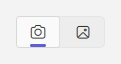
Segmented {
    SegmentedItem {
        icon.name: "ic_fluent_camera_20_regular"
        ToolTip {
            text: qsTr("Camera")
            visible: parent.hovered
        }
    }

    SegmentedItem {
        icon.name: "ic_fluent_image_20_regular"
        ToolTip {
            text: qsTr("Image")
            visible: parent.hovered
        }
    }
}
Provide an accessible name or tooltip when relying on icons alone.
Dynamic Items
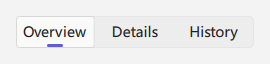
Because it inherits TabBar, Segmented can use Repeater and expose the selected index through currentIndex:

Segmented {
    id: segmented
    currentIndex: 0

    Repeater {
        model: [qsTr("Overview"), qsTr("Details"), qsTr("History")]

        SegmentedItem {
            text: modelData
        }
    }
}
States and Selection
currentIndex: selected index, inherited fromTabBar.currentItem: selected item, inherited fromTabBar.enabled: disables the entire control whenfalse.SegmentedItem.checked: selected state maintained byTabBar; normally do not set it manually.SegmentedItem.icon.name: Fluent icon name.
Listen for selection changes:
Segmented {
    onCurrentIndexChanged: {
        console.log("Current segment:", currentIndex)
    }
}
For page-level navigation with back history, use NavigationView instead of treating a segmented control as a router.
Compared with SelectorBar
Segmented has a shared border and filled container, emphasizing a compact set of mutually exclusive options in forms, toolbars, and local view switches. SelectorBar omits the outer background and behaves more like tab-style navigation.
Related Components
- SelectorBar: selector bar without an outer container.
- NavigationView: page-level navigation.
- NavigationBar: vertical navigation bar.