
ToolTip
ToolTip is a lightweight popup for adding short explanations to controls such as buttons and icons. RinUI's ToolTip is based on Qt Quick Controls and uses the current theme for its background, border, text, and shadow.
Basic Usage
Declare ToolTip as a child of the target control and set its text. Bind visible to the control's hover state to show it when the pointer enters.
qml
Button {
    text: qsTr("Save")
    hoverEnabled: true

    ToolTip {
        text: qsTr("Save your changes")
        visible: parent.hovered
    }
}
## Set Delay and Timeout

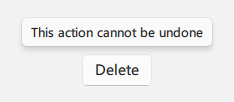
`delay` controls how long to wait before showing the tooltip; `timeout` controls how long it remains visible. RinUI's `timeout` defaults to `-1`, which means it does not close automatically. Set a duration when automatic dismissal is needed.

<div align="center">
  <img src="/assets/images/docs/ToolTip/example-3.png" alt="Set Delay and Timeout">
</div>

```qml
Button {
    text: qsTr("Delete")
    hoverEnabled: true

    ToolTip {
        text: qsTr("This action cannot be undone")
        visible: parent.hovered
        delay: 500
        timeout: 3000
    }
}
## Customize Theme Colors

Override color properties for a specific context. If they are not overridden, colors follow the current RinUI theme.

<div align="center">
  <img src="/assets/images/docs/ToolTip/example.png" alt="Customize Theme Colors">
</div>

```qml
Button {
    text: qsTr("Help")
    hoverEnabled: true

    ToolTip {
        text: qsTr("Open help")
        visible: parent.hovered
        backgroundColor: "#202020"
        borderColor: "#505050"
        textColor: "white"
    }
}
## Properties

- `text`: Tooltip content.
- `visible`: Whether to show the tooltip; usually bound to the target's hover or focus state.
- `delay`: Delay before display, in milliseconds.
- `timeout`: Display duration, in milliseconds; `-1` disables automatic dismissal.
- `backgroundColor`: Background color; defaults to the theme acrylic background.
- `borderColor`: Border color; defaults to the theme card border.
- `textColor`: Text color; defaults to the theme text color.
- `controlRadius`: Background corner radius; defaults to the theme control radius.