
カラーピッカー (ColorPicker)
ColorPicker は HSV 色領域、色のプレビュー、任意のチャンネル入力を備え、色の選択や微調整に使えます。選択色は color で読み書きし、alphaEnabled を有効にすると透明度を編集できます。
基本的な使い方
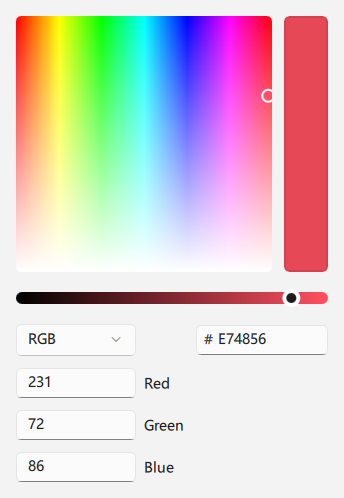
qml
ColorPicker {
    color: "#E74856"
}
## アルファの有効化

`alphaEnabled` を有効にすると、アルファ関連の操作項目が表示されます。`#80E74856` のように、アルファ値を含むカラー形式も使用できます。

<div align="center">
  <img src="/assets/images/docs/ColorPicker/example-3.png" alt="アルファの有効化">
</div>

```qml
ColorPicker {
    color: "#80E74856"
    alphaEnabled: true
}
## リングモード

既定では四角形の HSV 領域を使用します。`ringMode` を設定すると色相リングに切り替わります。

<div align="center">
  <img src="/assets/images/docs/ColorPicker/example-4.png" alt="リングモード">
</div>

```qml
ColorPicker {
    color: "#3A86FF"
    ringMode: true
}
## 補助入力項目

画面スペースに応じて、チャンネル、16 進数、アルファの入力項目を非表示にできます。

<div align="center">
  <img src="/assets/images/docs/ColorPicker/example.png" alt="補助入力項目">
</div>

```qml
ColorPicker {
    color: "#107C10"
    colorChannelInputVisible: false
    hexInputVisible: true
    alphaSliderVisible: false
    alphaInputVisible: false
}
## 主なプロパティ

- `color`: 選択色。内部の HSV とアルファ値も更新します。
- `hue`、`saturation`、`value`: HSV の各成分。
- `alpha`: `0` から `1` までの透明度。
- `alphaEnabled`: アルファ編集項目を有効にするかどうか。
- `ringMode`: 色相リングを使うかどうか。既定値は `false`。
- `collapsed`: 詳細なカラー入力を折りたたむかどうか。
- `moreVisible`: 追加のカラーオプションを表示するかどうか。
- `colorSliderVisible`: カラースライダーを表示するかどうか。
- `colorChannelInputVisible`: チャンネル入力を表示するかどうか。
- `hexInputVisible`: 16 進数入力を表示するかどうか。
- `alphaSliderVisible`、`alphaInputVisible`: アルファスライダーと入力欄を表示するかどうか。
- `channelFieldWidth`: カラーチャンネル入力欄の幅。