
TextArea(テキストエリア)
TextArea は、標準の QML TextArea に似ていますが、カスタムスタイルと機能を追加した複数行テキスト入力コントロールです。複数行のテキスト入力、サイズ調整、テキスト選択と編集をサポートしています。
基本使用
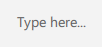
qml
TextArea {
    id: control
    width: 300
    height: 120
    placeholderText: qsTr("Type here...")
}
## カスタムスタイル

<div align="center">
  <img src="/assets/images/docs/TextArea/example-3.png" alt="カスタムスタイル">
</div>

```qml
TextArea {
    id: control
    width: 300
    height: 120
    placeholderText: qsTr("Type here...")
    primaryColor: "#3A86FF"
}
## フレームレスモード

<div align="center">
  <img src="/assets/images/docs/TextArea/example-4.png" alt="フレームレスモード">
</div>

```qml
TextArea {
    id: control
    width: 300
    height: 120
    placeholderText: qsTr("Type here...")
    frameless: true
}
## 読み取り専用モード

<div align="center">
  <img src="/assets/images/docs/TextArea/example.png" alt="読み取り専用モード">
</div>

```qml
TextArea {
    id: control
    width: 300
    height: 120
    text: qsTr("This is a read-only multiline text field.")
    editable: false
}
## 重要なプロパティ

- `text`: コントロールに表示されるテキスト
- `placeholderText`: コントロールが空のときに表示されるプレースホルダーテキスト
- `editable`: ユーザーがテキストを編集できるかどうか
- `frameless`: ボーダーを表示するかどうか
- `primaryColor`: カスタムテーマ色
- `selectByMouse`: マウスでテキストを選択できるかどうか