
页面指示器 (PageIndicator)
PageIndicator 用一组圆点表示分页集合中的当前位置,避免直接显示页码。它常与 SwipeView 配合用于图片轮播和分步页面,并支持交互式点击切换。
与 SwipeView 配合
将指示器的 count、currentIndex 与分页视图绑定,并把用户在指示器上的选择同步回视图。
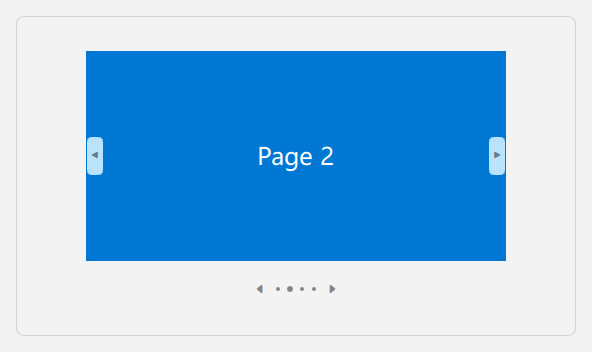
qml
ColumnLayout {
    SwipeView {
        id: pages
        Layout.preferredWidth: 400
        Layout.preferredHeight: 270
        currentIndex: 0

        Rectangle { color: "#E74856" }
        Rectangle { color: "#0078D4" }
        Rectangle { color: "#6B69D6" }
        Rectangle { color: "#107C10" }
    }

    PageIndicator {
        id: indicator
        count: pages.count
        currentIndex: pages.currentIndex
        interactive: true
        onCurrentIndexChanged: pages.currentIndex = currentIndex
        Layout.alignment: Qt.AlignHCenter
    }
}
显示前后切换箭头
caret 开启前后页箭头;箭头只会在存在对应上一页或下一页时显示。用户点击圆点或箭头后,currentIndex 会更新。
qml
PageIndicator {
    count: 8
    currentIndex: 2
    interactive: true
    caret: true
}
主要属性
| 属性 | 说明 |
|---|---|
count | 分页总数。 |
currentIndex | 当前页索引。 |
interactive | 是否允许点击圆点或箭头切换。 |
caret | 是否显示前后切换箭头。 |
spacing | 指示点之间的间距。 |
相关内容
- SwipeView:分页内容容器。